Terminal
~ % ▌The old way
 BrewStore
BrewStore is a free, open-source desktop app for
Homebrew — the Mac package manager developers already use. Browse
casks and formulae, run brew outdated and
brew upgrade, manage brew services, and
export a Brewfile, without memorizing tokens. Official site:
brewstore.app (not a beer shop).
Same install. Two ways.
Terminal
~ % ▌The old way
BrewStore
The store way
Browse Homebrew casks like an App Store
Nothing matches. Try ffmpeg or rectangle.
Same brew. Visible.
Developers search brew outdated, brew upgrade,
brew cleanup, and brew bundle dump. BrewStore
runs those against the Homebrew you already have.
| You type | In BrewStore |
|---|---|
brew install wget / brew install --cask firefox |
Catalog → Get (formula or cask) |
brew search |
Search the full index, or ⌘K |
brew outdated |
Updates list + sidebar badge |
brew update |
Updates → Update Homebrew |
brew upgrade |
Updates → Update All |
brew list |
Installed |
brew reinstall / brew uninstall --zap |
Package detail → Reinstall / Zap |
brew cleanup / brew doctor / brew autoremove |
Maintain |
brew bundle dump |
Maintain → Brewfile export, preview, import |
brew services / brew tap / brew pin |
Maintain + pin on the formula |
For people who already type brew
Updates is brew outdated with versions, then Update All
for brew upgrade. Update Homebrew is
brew update.
A Homebrew cask GUI and a formula GUI in one catalog — Firefox next to wget, filtered as GUI or CLI. Not casks-only.
brew bundle dump, brew services,
brew tap, pin, zap, doctor, and cleanup live under
Maintain — same CLI, visible.
Cakebrew is discontinued. BrewStore is a free MIT replacement that still covers formulae and casks. Compare Cork, Applite, WailBrew.
For Homebrew on macOS. Not MacPorts, nix-darwin, Fink, or pkgsrc.
If you live in brew, this is the frontend.
MIT license. Clone BrewStore-by-Manish-Vagh, star the repo, open a PR. How to build from source.
What you see
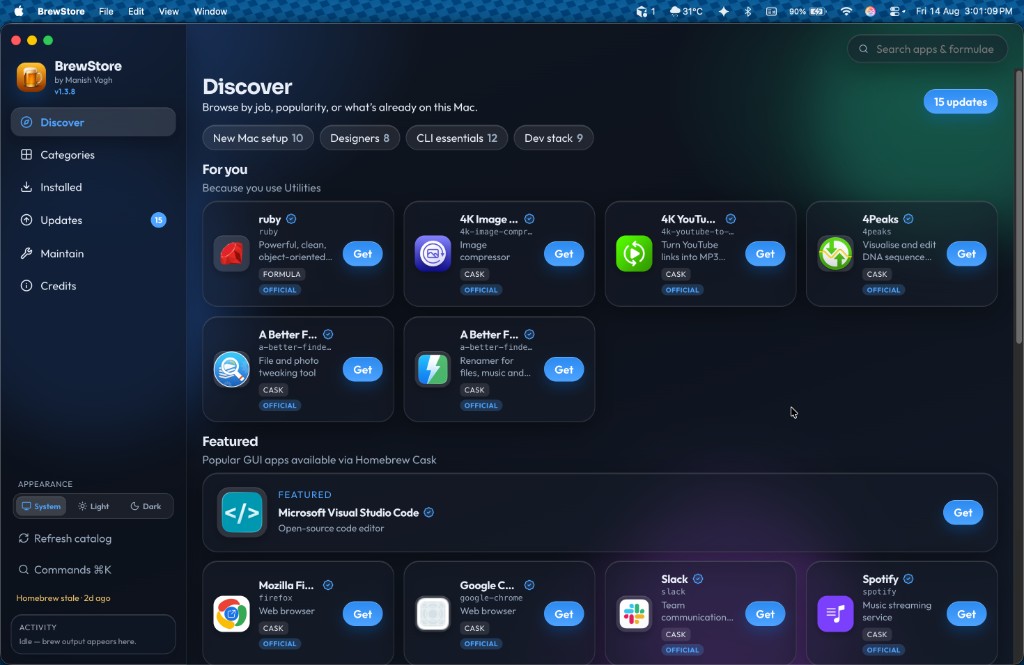
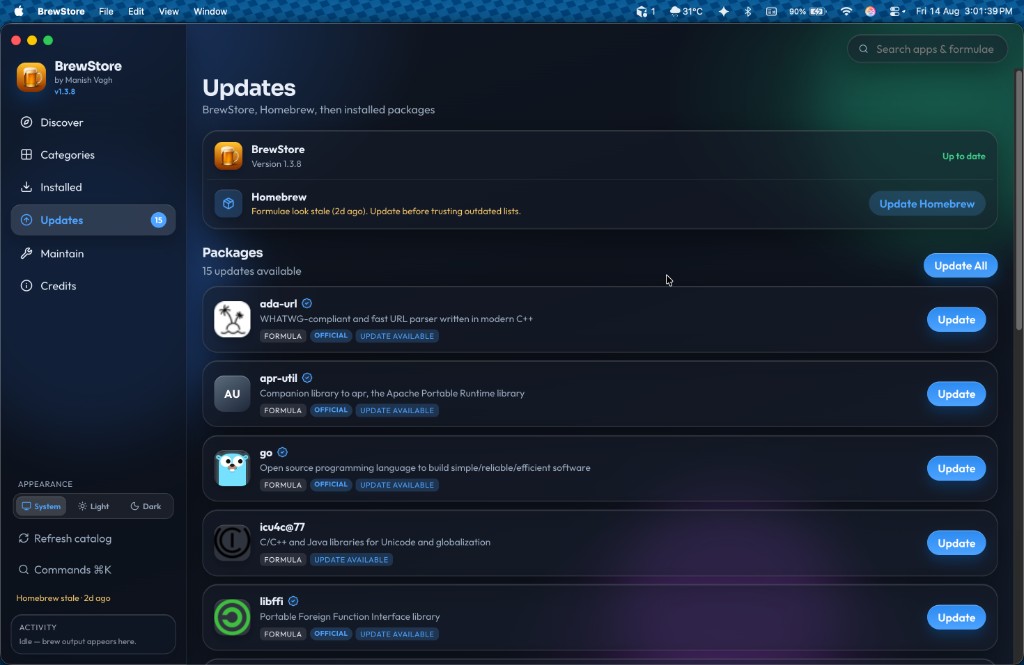
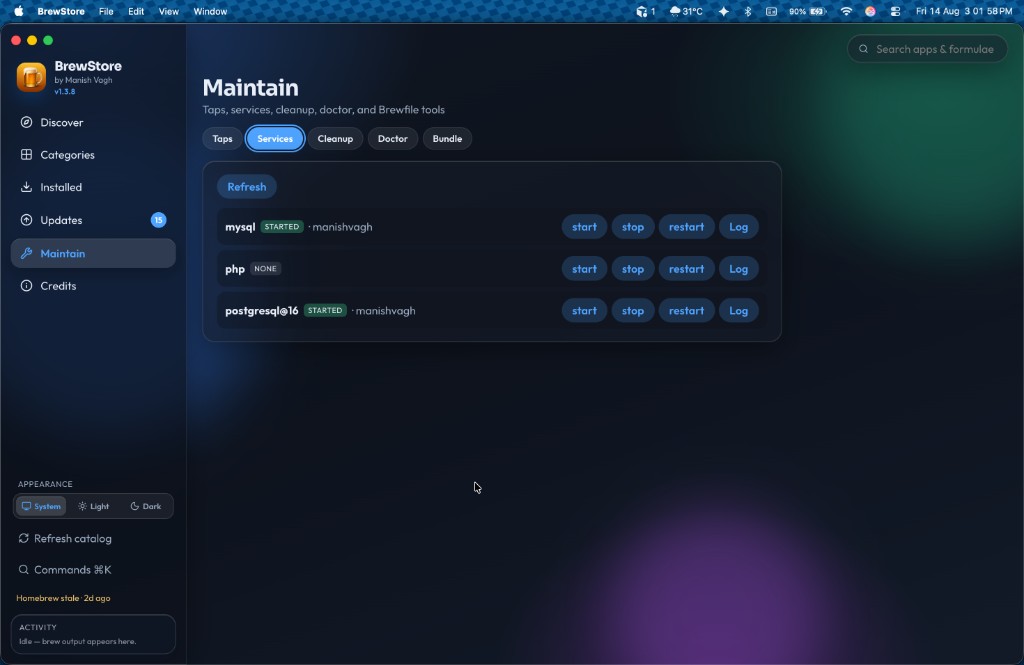
Open source
BrewStore is MIT-licensed Electron + TypeScript. It shells out to the Homebrew you already have — no account, no telemetry store, no paid prebuilt. Source lives on GitHub so other developers can see there is a full-catalog Homebrew GUI that is free.
v1.3.9 · Apple Silicon · MIT license · uses the Homebrew you already have
brew install --cask manishvagh/brewstore/brewstoreOr download a build:
First launch is unsigned — right-click Open, or
xattr -cr /Applications/BrewStore.app
git clone https://github.com/manishvagh/BrewStore-by-Manish-Vagh.git
cd BrewStore-by-Manish-Vagh
npm install && npm run install:mac
FAQ
A free Homebrew GUI for Mac by Manish Vagh. Browse casks and formulae, then install and update without memorizing brew tokens.
No. brewstore.app is the official site for BrewStore, a macOS GUI for Homebrew (the Mac package manager). It is not a beer-brewing platform, not Brewfather, and not a console Homebrew App Store.
Yes. It uses the Homebrew you already have and shows the catalog like a store — not a terminal cheat sheet.
Yes. Cakebrew is discontinued. BrewStore is a free MIT Homebrew GUI
for Mac that manages both casks and formulae — browse, install,
brew upgrade, brew outdated, cleanup, doctor,
and Brewfile export.
brew update refreshes Homebrew’s package list.
brew upgrade installs newer versions of what you already
have. In BrewStore, Updates has Update Homebrew
(brew update) plus brew outdated, and
Update All runs brew upgrade.
In Terminal: brew update then brew upgrade.
In BrewStore open Updates, click Update Homebrew if formulae look
stale, then Update All — same brew upgrade, with a queue
and live output.
A formula is a CLI tool (brew install wget). A cask is a
Mac app (brew install --cask firefox). BrewStore shows
both in one catalog, filtered as GUI or CLI.
Yes. Maintain includes Brewfile export, a preview/diff against this
Mac, then import — the same idea as brew bundle dump, so
you can snapshot packages and restore them on a new Mac.
Yes. The Updates list is brew outdated with versions,
per-package upgrade, and Update All. The sidebar badge shows how many
are behind.
Cork is a paid native Homebrew GUI. Applite focuses on casks for less technical users. BrewStore is free and open source, covers casks and formulae, including brew services, taps, pin, Brewfile preview, zap/reinstall, and disk usage. The DMG is unsigned.
Yes. Open Updates — BrewStore sits above Homebrew.
If a newer GitHub release exists, Update installs it
into Applications and relaunches. Credits and the sidebar banner still
work too. You can still grab the DMG or .app zip from this
page.
On Apple Silicon:
brew install --cask manishvagh/brewstore/brewstore.
That uses the third-party tap
manishvagh/homebrew-brewstore.
Official Homebrew Cask does not accept unsigned apps.
Yes. MIT license. Optional PayPal support is never required.
Yes. BrewStore does not replace brew. It gives it a UI.
Yes. MIT license. github.com/manishvagh/BrewStore-by-Manish-Vagh — clone, star, open issues, send a pull request. Tap: manishvagh/homebrew-brewstore. More on the open-source page.
Yes. Updates is brew outdated with versions, per-package
upgrade, and Update All for brew upgrade. Update Homebrew
runs brew update.
Both. Unlike Applite (casks only), BrewStore covers Homebrew casks and formulae — GUI apps and CLI tools in one catalog.
No. It is a frontend for Homebrew only. MacPorts, nix-darwin, Fink, pkgsrc, and Conda keep their own tools.
Homebrew’s BrewUI is early. Cakebrew is discontinued. BrewStore is an independent open-source Homebrew GUI — not an official Homebrew project. See alternatives.
WailBrew is a Wails/React Homebrew manager. BrewMate is Electron and cask-focused. BrewStore is free MIT Electron covering casks and formulae, including services, taps, pin, Brewfile, zap, and disk usage.
The DMG is unsigned. Right-click Open, or run
xattr -cr /Applications/BrewStore.app.
Copied